AI Made You Faster. It Hasn't Made Your Team Faster. Yet.
Every Claude session starts from a blank slate. The missing layer is shared context, visible progress, and a plan the agent can read from and write back to.
Your team is using Claude. Or Cursor. Or Codex. Each developer has their own sessions, their own context, their own results. The agent is fast. The team is not getting faster together.
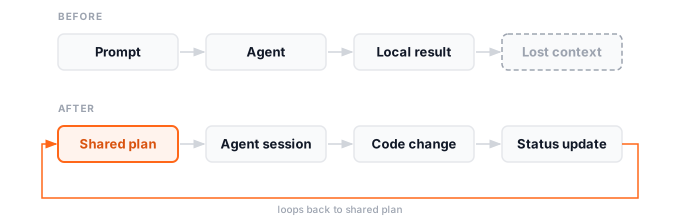
That is what I kept running into. Individual productivity was real — Claude is good at that. But each session started from scratch. Nothing from one session carried into the next. Nothing from one developer’s sessions was visible to anyone else. The agent had no memory of what the team was building or what had already been decided.
I wanted the agent to stop working from isolated prompts and start working from the same plan the team was using.
That became Stokik.
Here is the full workflow in practice — Claude generates the plan, the canvas populates live, then Claude builds from it:
Why every session starts from zero
The underlying problem is that AI coding agents still do not have a reliable shared memory of how the team is planning and executing the project. Each session begins with whatever you give it: a pasted ticket, a description you type by hand, some context you pull from memory. The agent helps. The session ends. The next developer — or even the same developer the next day — starts over.
Working alone, this is manageable. In a team it compounds. The backend developer who changed the auth model on Tuesday did not update anyone else’s context. The frontend developer picking up a related task on Thursday has no way to know. Nobody is deliberately withholding anything. The information just never had a place to live that the agent could read.
Each team member is working toward the same goal, but in their own silo. The agent makes each silo faster. The silos are still silos.
A shared plan the agent reads from and writes back to
Stokik is a canvas where tasks are nodes and dependencies are labeled edges. The shape of the work is visible: which tasks block which others, what is in scope, what is in progress, what is done. Each task carries a document — a spec, an investigation, implementation notes, the reasoning behind a decision.
The canvas is shared. Every developer sees the same picture. When someone changes a technical decision, scopes a task differently, or discovers a new dependency, it goes into Stokik. The context travels with the work rather than staying in the head of whoever made the call.
This is not just for engineers. Product managers can see the dependency graph, understand what is blocked, and contribute to planning without needing to decode a technical backlog or wait for a standup summary. Non-technical team members get a visual form of the plan they can actually read. Developers stop being the translation layer between what is being built and what everyone else can see.
Because Stokik has a native MCP server, the agent can read all of it.
Connecting the agent
One command to connect Claude Code:
claude mcp add --transport http stokik https://api.stokik.com/mcp/ \
  --header "Authorization: Bearer stokik_mcp_..."
Generate a token from Settings > MCP Integrations in Stokik. The full setup for both Claude Code and Codex is in How to Connect Claude and Codex to Stokik with MCP.
Once connected, start a session with the actual plan in scope:
Use Stokik MCP and inspect the project named "Checkout Revamp".
Read the tasks, documents, and edges. Find the next task that is ready,
make the relevant code change, update the status, and record progress.
The agent reads the canvas — which tasks are blocked, which are ready, what the attached documents say. When it finishes, the status update and progress note go back into Stokik. The next developer, or the next session, can see what was done and what is still open.
The session does not disappear. That is the loop: session runs, work gets done, the plan reflects it, the team sees it.
The collaboration contract
The MCP connection solves the reading problem. The skill file solves the consistency problem.
When multiple developers run agent sessions against the same project, you want those sessions to behave consistently. Same label conventions, same status rules, same understanding of when to create a task versus update an existing one. Without this, different sessions contradict each other and the shared canvas fills with noise instead of signal.
A skill file is a markdown document checked into the repo that defines how agent sessions interact with the Stokik project. Which project to use. What a good task label looks like. How to handle agent runs. What to check before creating a task.
For Claude Code, one line in CLAUDE.md:
@.claude/stokik.md
Every developer who opens Claude Code in that repo inherits the conventions automatically. The team decides how the agent contributes — not each individual independently, rediscovering the same conventions every session.
This is what makes it a team tool rather than a collection of individual ones. The plan in Stokik defines what needs to be built. The skill file defines how agents participate in building it. Together they give the team a collaboration contract that covers both human and AI contributors.
The full skill file format — task label conventions, status rules, document structure, agent run lifecycle — is covered in How to Add a Stokik Skill to Your Codebase.
What changes for the team
AI coding tools made individual developers faster. That is real and worth keeping. What was missing was team leverage: a shared plan every session could read from and write back to, and a way for the team to define how agents contribute rather than leaving each developer to figure it out separately.
The sessions stop being islands.
The same canvas model also works beyond engineering teams, for personal planning and learning roadmaps.
Stokik is at stokik.com. Still early and in beta, free to start with no waitlist. Curious what you think.