Understanding Compaction
Compaction is not a bug. It is the agent's memory management layer — and once you understand it, you design around it.

Practical Claude workflows for marketing, engineering, and everyday work — built for people who'd rather think than repeat themselves.
You are forty minutes into a code review with Claude. A complex authentication overhaul — eight files, security implications you have been mapping carefully. Claude has been methodical: checking the middleware chain, spotting the expired-token edge case, tracking the open questions as they pile up.
Then the session pauses for a beat. Claude resumes. Something is off. The response feels generic. You ask about the middleware ordering decision from twenty minutes ago — the one that settled a key design question. Claude acts like it never happened.
It did not forget. It compacted.

This post traces compaction from the ground up: why it exists, how it works mechanically, what the default summariser preserves and silently drops, and how to design agents that treat it as a known quantity rather than an occasional surprise.
Why Compaction Exists
The instinct is to frame this as a limitation. The window fills up, Claude forgets things. That framing is not wrong, but it misses what is actually happening and why the solution looks the way it does.
Signal degrades with conversation density
Long conversations accumulate noise: abandoned reasoning paths, superseded decisions, intermediate tool outputs that were useful when they arrived and are now just weight. A transformer attends over the entire sequence on every forward pass — it is paying compute to process content that contributes nothing to the current answer. A larger window does not fix this. It gives you more room to accumulate noise before the problem surfaces.
The hardware cost is real and linear
Separately from attention quality, context has a memory cost. Every token in the conversation occupies KV cache on the inference hardware — fixed cost per token, per layer, per attention head. At 200K tokens, a single session consumes a meaningful slice of the VRAM allocated to it. At 1M tokens, this cost dominates. Infinite context is not free — it is just a question of when the bill comes due. Compaction is Anthropic’s answer: compress aggressively, continue with a clean slate, pay the hardware cost only for what still matters.
The trigger
Claude Code’s auto-compact fires based on a threshold calculated from the context window. The hardcoded reserve in the source is 33,000 tokens — the system subtracts that from the total window to get the trigger point, which lands at roughly 83.5% of the 200K window. When you hit that ceiling, compaction fires automatically. You do not choose when. You can adjust the threshold with CLAUDE_AUTOCOMPACT_PCT_OVERRIDE, but the default is designed to leave enough room for the compaction process itself to run without hitting the limit mid-summary.
Compaction is infrastructure
The right mental model is not “Claude forgot things.” It is “Claude’s memory manager ran.” Every long-running program manages memory. The difference here is that the garbage being collected is conversational context, and the replacement is a lossy summary. Understanding what gets lost — and what survives — is the engineering problem worth solving.
How It Works
Enabling it via the API
The Messages API compaction feature is gated behind a beta header:
anthropic-beta: compact-2026-01-12
Note the hyphens. The internal type identifier used inside the request body uses underscores — compact_20260112 — but the header uses the hyphenated date format. Getting this wrong means the feature silently does not activate.
To tell the API you want compaction enabled for a request, you pass a context_management field in the request body:
{
  "model": "claude-opus-4-6",
  "max_tokens": 8096,
  "context_management": {
    "edits": [
      {
        "type": "compact_20260112"
      }
    ]
  },
  "messages": [...]
}
The context_management.edits array is the same field used for other context operations — clearing tool use results, clearing extended thinking blocks. Compaction is one edit type among several.
The sequence
When compaction fires, the following happens in order:
- Detect — The system determines that the conversation has crossed the trigger threshold.
- Summarise — Claude generates a prose summary of the conversation so far. This summary is the compaction output.
- Create the compaction block — The summary is wrapped in a structured block with
type: compact_20260112. - Drop prior messages — The original message history is discarded. The compaction block replaces it. From this point, Claude only sees the summary plus any messages that arrived after compaction.
What your message array looks like before:
[
  { "role": "user", "content": "Review this PR..." },
  { "role": "assistant", "content": "I've looked at the middleware chain..." },
  { "role": "user", "content": "What about the token refresh race condition?" },
  ...40 more turns...
]
What it looks like after:
[
  {
    "role": "user",
    "content": [
      {
        "type": "compact_20260112",
        "summary": "The user is reviewing a PR that adds authentication middleware. Key decisions made: middleware runs after the rate limiter but before route handlers. Open issues: expired token handling returns 500 instead of 401, token refresh race condition untested. Next step: address the error handling issue in auth.ts before approval."
      }
    ]
  },
  { "role": "user", "content": "Can we also check the logging setup?" }
]
The original forty turns are gone. What remains is a paragraph — and whatever came after compaction fired.
pause_after_compaction — the feature most builders miss
By default, compaction runs transparently mid-stream. The model summarises, drops the history, and continues generating as if nothing happened. You usually cannot tell from the output alone that it fired.
pause_after_compaction changes this. Set it to true and the API returns after generating the summary, with stop_reason: "compaction". You get back the compaction block. You can inspect it, augment it, inject additional context — then resume the generation by sending the continuation request.
{
  "context_management": {
    "edits": [
      {
        "type": "compact_20260112",
        "pause_after_compaction": true
      }
    ]
  }
}
Most engineers building on the Messages API do not know this exists. It is the hook that lets you treat compaction as a first-class event in your agent’s lifecycle rather than something that happens to you.
Streaming behaviour
During streaming, compaction produces a distinct delta type. When a compaction block is being streamed, the delta type is compaction_delta. Regular text content uses text_delta. The full compaction summary arrives as a single content_block_delta event — the summary does not stream incrementally the way generated text does. You receive content_block_start, one content_block_delta with the complete summary, then content_block_stop.
elif event.type == "content_block_delta":
    if event.delta.type == "compaction_delta":
        # Full summary arrives in one event
        print(f"Compacted: {len(event.delta.content)} chars")
    elif event.delta.type == "text_delta":
        print(event.delta.text, end="", flush=True)
If you are building a streaming agent and not handling compaction_delta, you are silently dropping compaction events. Whether that matters depends on what you do with the stream — but it is worth knowing the event exists.
The Default Summarisation Prompt
Anthropic publishes the default compaction prompt in their documentation. It reads:
You have written a partial transcript for the initial task above. Please write a summary of the transcript. The purpose of this summary is to provide continuity so you can continue to make progress towards solving the task in a future context, where the raw history above may not be accessible and will be replaced with this summary. Write down anything that would be helpful, including the state, next steps, learnings etc. You must wrap your summary in a
<summary></summary>block.
Three things it asks for: state (where things stand), next steps (what was planned), learnings (what was established as true). Note what it does not ask for: specific file names, line numbers, the reasoning behind a decision, or constraints that were stated once and not repeated. The prompt is optimised for task continuity — getting the agent back on track. It is not optimised for technical fidelity.
This is a reasonable general-purpose prompt. For a casual conversation or a one-off exploration, it works well.
What it preserves
- High-level decisions (“we decided to use JWT over sessions”)
- Overall task direction (“reviewing the auth PR, next step is error handling”)
- Named entities — file names, PR numbers, and service names typically survive
- The most recent exchange — whatever happened immediately before compaction is usually intact
What silently disappears
- Specific line numbers, function names, and variable names from code discussed earlier
- The reasoning chain behind a decision — you get the conclusion, not why
- Partial results from tool calls that happened mid-session
- Nuanced constraints that were stated once and never repeated (“don’t touch the legacy auth path, it’s untested”)
- The order in which things were discovered — which matters when sequence changed the meaning
The information loss curve
Compaction is heavily lossy by design. A long conversation — say 150K tokens — may produce a summary of 20–30K tokens. At that compression ratio, you are retaining a small fraction of the original information mass. The exact ratio varies with conversation density and the model’s judgment about what matters. The question is never how much survives — it is which parts.
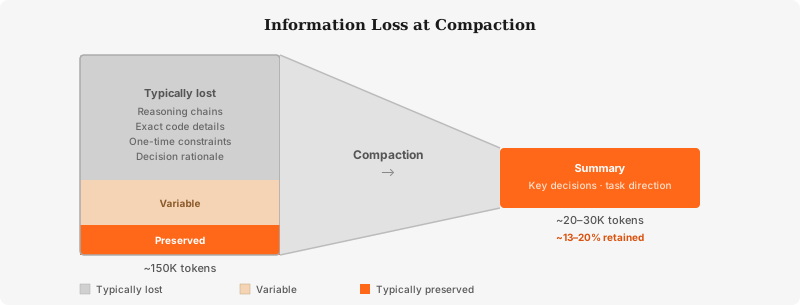
The default prompt is optimised for what to do next, not what was true earlier. This works well for task-oriented sessions where the agent needs to continue. It works poorly for sessions where earlier context — a constraint, an architectural observation, a specific piece of state — is still relevant but has not been referenced recently. The further back in the conversation the information lives, and the less it has been reinforced, the higher the probability it does not survive.
This is not a failure of the summariser. It is a rational choice given a generic prompt. The fix is not a better default — it is a better prompt for your specific use case.
Custom Instructions — The Underused Lever
The compaction prompt is overridable. The compact_20260112 edit type accepts an instructions field that completely replaces the default prompt:
{
  "type": "compact_20260112",
  "instructions": "Your custom summarisation instructions here."
}
This is the lever most builders ignore. The default prompt is designed to work adequately for everything. Your custom prompt can be designed to work well for your specific agent.
What a generic summary looks like
An agent running a code review session with the default summariser might produce:
The user is reviewing a pull request that modifies the authentication layer. We discussed various aspects of the implementation including security considerations, test coverage, and code structure. The main concerns were around error handling and some potential edge cases. The review is ongoing and the user plans to continue examining the code.
This survives compaction. It tells the next Claude instance that a PR review is happening. It loses everything that made the session productive: which files, which decisions, which specific issues, which of them are blockers.
What a targeted summary looks like
With a targeted instructions field that tells Claude to prioritise specific information:
You are summarising a code review session. Preserve the following precisely:
- The PR number and title
- Every file that was examined, with the specific concerns noted for each
- All decisions made and their rationale
- Every issue flagged, marked as blocking or non-blocking
- The current reviewer disposition (approved / changes requested / pending)
- Any constraints or rules that were stated (do not touch X, Y must be done before Z)

Do not generalise. If a specific line number or function name was discussed, include it.
The same session now compacts to:
PR #4821 — “Add JWT authentication middleware”. Files reviewed: src/middleware/auth.ts (new — expired token handling returns 500 instead of 401 on line 47, blocking), src/routes/api.ts (modified — middleware ordering confirmed correct: rate limiter → auth → route handlers). Open issues: (1) auth.ts line 47: 500 vs 401 status code — blocking, (2) no test for concurrent token refresh race condition — non-blocking. Architectural constraint noted: do not modify the legacy session auth path in src/auth/legacy.ts — it is untested. Current disposition: changes requested. Do not approve until issue 1 is resolved.
The difference is not cosmetic. After compaction fires, the second summary lets Claude continue the review with precision. The first summary produces generic answers because it has only generic inputs.
The principle
Tell the summariser what your agent actually cares about. If your agent works with code, ask it to preserve file names, function names, and line numbers. If it manages a stateful workflow, ask it to preserve step completion status. If it tracks decisions with rationale, ask it to preserve the reasoning, not just the conclusion. The default prompt does not know what your agent does. Yours can.
Compaction vs. Just Using 1M Context
A reasonable question: if the 1M token window is now generally available, why does compaction still matter? Fill the window, run longer.
Size and latency scale together
A 1M token context is not free. Every token in the window costs KV cache memory and adds to the latency of every forward pass — this cost scales linearly with window size, regardless of how you got there. A session that reaches 900K tokens through normal use is paying the full inference cost of 900K tokens on every response. The window being large does not make that cheaper.
Compaction is active memory management. It discards what is no longer needed and replaces it with a compressed representation. A 1M window is passive headroom — the capacity is there when you need it, but the goal is not to fill it. The goal is to run as long as needed while keeping inference cost proportional to what the current task actually requires.
The 15% figure
In Anthropic’s GA announcement for the 1M context window, they reported a 15% decrease in compaction events across Claude Code usage. Agents that previously compacted frequently now have enough headroom to run longer without hitting the threshold.
The number worth sitting with is the other 85%. Even with a 1M window, 85% of compaction events still fire. The sessions that were triggering compaction were not just bumping against a 200K ceiling — they were generating dense, long-running conversations that will fill any practical window eventually. The 1M context helps. It does not eliminate the problem.
The right mental model
Treat the 1M window and compaction as complementary, not competing. The large window means fewer compactions and more headroom for complex single sessions. Compaction means that when you do hit the limit, the session can continue productively rather than terminating. A well-designed agent uses both: the large window delays compaction, and good custom instructions ensure that when compaction fires, the right information survives.
What This Means for Agent Design
If you are building a long-running agent — one that handles code review, research, debugging, multi-step workflows — compaction will fire. Not occasionally. Regularly. The design question is not how to prevent it. It is how to build an agent that continues to work well after it fires.
Design for the summary, not the conversation
Every piece of information your agent needs to carry across a compaction event should be explicitly represented in a way the summariser will preserve. If a constraint is important, state it frequently enough that it survives compression. If a decision has rationale that matters, make the rationale explicit in the conversation — the summariser will have something to work with.
Better still: write important state to files. A PROGRESS.md in the working directory, updated as the session proceeds, survives compaction completely. Files are outside the message array. They are not subject to the summariser’s choices. If your agent can read and write files, persistent state belongs in files — not in conversational history you expect to survive.
CLAUDE.md as the compaction anchor
The CLAUDE.md file from Part 1 of this series survives compaction in a specific sense: it is loaded at session start, before the conversation begins, which means it always sits outside the message history that gets summarised. Your architecture conventions, your constraints, your naming standards — if they are in CLAUDE.md, they are present after every compaction. Throwaway system prompts that live only in the conversation do not have this property.
Compaction as the short-term memory boundary
Here is the honest framing: compaction is the boundary between short-term and long-term memory in your agent’s architecture. Anything you need the agent to remember across that boundary needs to be stored somewhere that compaction cannot touch — a file, a database, a structured log. Anything you are comfortable losing can live in the conversation.
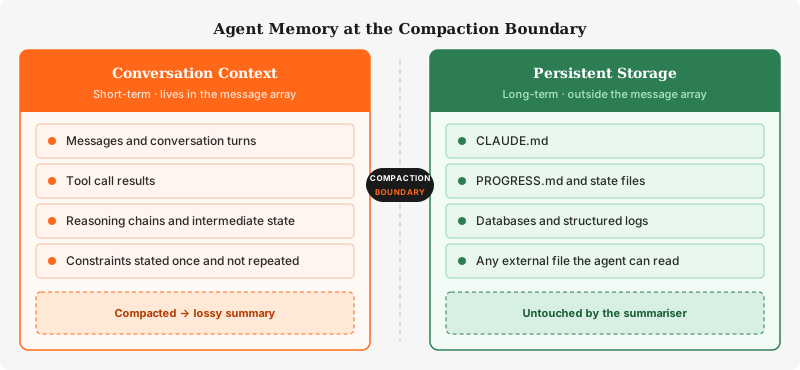
Most builders ignore this boundary until compaction fires and something important disappears. The better approach is to design with the boundary in mind from the start: what does this agent need to remember, and where should that information live?
What to Do Next
If you are using Claude Code: compaction fires automatically. You cannot disable the trigger, but you can prepare for it. Write important state — progress, decisions, open constraints — to a file the agent can read back after compaction. Put non-negotiable conventions in CLAUDE.md so they are present before the conversation begins and survive every compaction event. If you want compaction to fire earlier — to keep sessions lighter — set CLAUDE_AUTOCOMPACT_PCT_OVERRIDE to a lower percentage.
If you are using the Messages API: add the anthropic-beta: compact-2026-01-12 header and a context_management.edits block with type: compact_20260112. Set pause_after_compaction: true if you want to inspect or augment the summary before the session continues — this is the safest way to build an agent where compaction is a first-class event rather than a silent background process. Write a custom instructions field that tells the summariser exactly what your agent cares about.
Either way: do not design agents that depend on conversational history surviving intact across long sessions. It will not.
MCP explained the tool layer — how Claude reaches out to act on the world. Compaction is the memory layer — how Claude manages what it knows over time. One mechanism determines what the agent can do. The other determines what it can remember while doing it. Build without understanding both and you are designing blind.
What neither explains is what happens when you stop thinking about a single agent and start thinking about several — coordination, delegation, shared state across independent sessions that each have their own context and their own compaction events. That is where agent design gets genuinely hard. That is coming next.